Projecting Lines onto Surfaces within Revit has been tricky for various reasons. One could argue that projecting lines and modeling with primitives are precisely the kind of things Revit was designed to avoid; and I agree with this attitude. But, there are times when you simply want something done a particular way. Fortunately Dynamo can let you be that impish individual that you want to be within the Revit world.
Dyanamo and Adaptive Lines
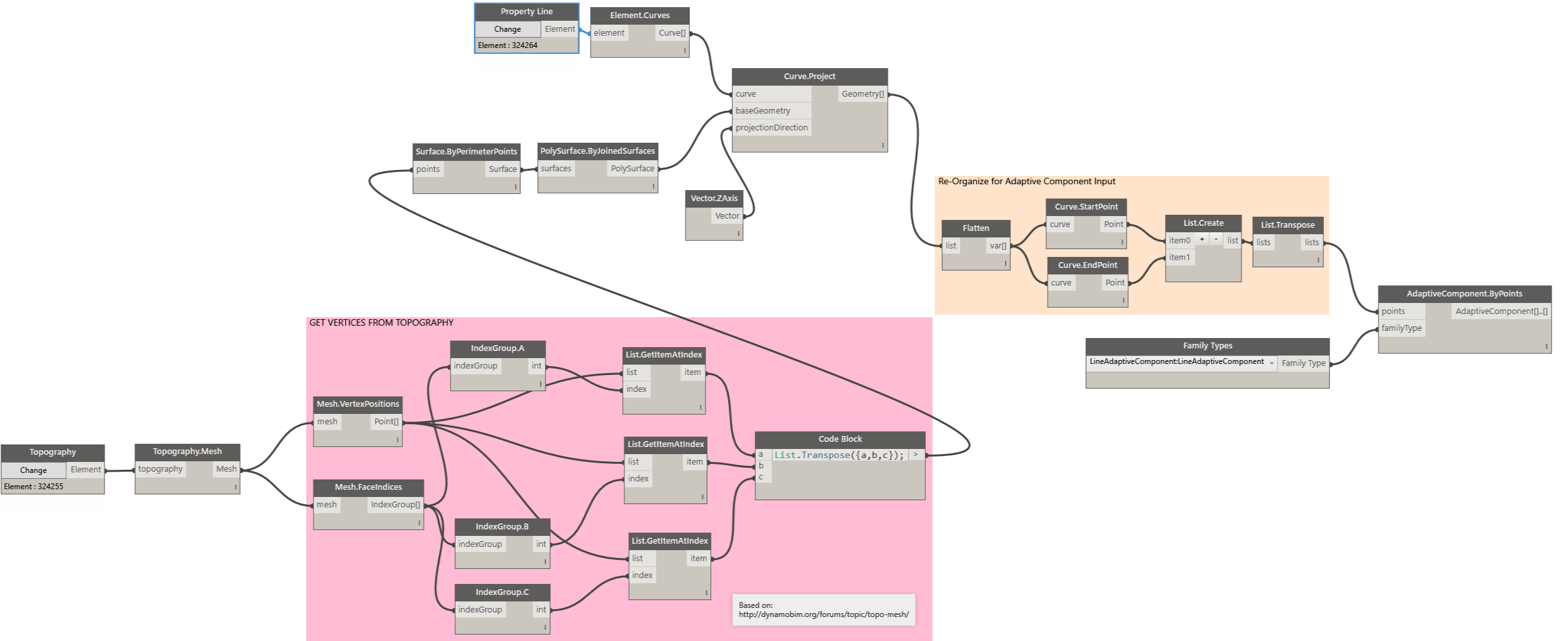
This recipe documents the process of using
Dynamo to project Property Line elements on to the Toposurface within
the Revit Project. The actual line work is somewhat tricky. One cannot
use Revit's Model Lines for this purpose because each Model Line needs to be associated with a Sketch Plane.
With a Complex Toposurface, this approach can be extremely convoluted. A
simpler approach is to use a linear element that is not tied to a
Sketch Plane. The only class of elements within Revit that allows
non-associative placement is the Adaptive Component Family.
Accordingly, the projection lines are traced at the start point and end
points using a single Adaptive Component consisting of two _Adaptive
Points and a Model Line stretching between them. The complete graph and family can be found here:
The Uncomplicated Approach
One can of course eschew the complicated
approach of using Dynamo and simply use the Sub Region within the
Massing and Site toolset. The results are acceptable except for the fact
that one cannot change the Line Style or host any other family along
the line. The image below shows the results of using the Sub Region.
As of Revit 2017, the task of displaying Area Tags in Floor Plans outside of Area Plans (such as Rentable Areas) is a manual one. An example of such an application would be an Apartment Building where the total floor area of every Apartment needs to be displayed in addition to room names and dimensions.
Unfortunately, one cannot place an Area Tag in a view other than an Area Plan. Although one can place a Room Tag in an Area Plan, a workflow where the primary plan views are based on Area Plans becomes quite restrictive as the Area Plan View Type does not allow some annotation types such as the call out head to be displayed. Additionally, the Area Boundary Lines themselves can be very annoying.
Many firms resort to a work-around where one places a Generic Annotation Tag in the Floor Plan views and manually updates the Apartment Number and Area. It feels like one is going backwards after adopting a powerful platform like Revit. This chapter is about automating the process of both placing Generic Annotation Tags and updating the same using Dynamo.
The first video of this post shows the placement of Generic Annotation Tags. The second video below, shows the process of updating the tags based on Area properties.
I've documented the rest of this process in the Gitbook and the source files are available on Github. Enjoy!
Excel and similar spreadsheet programs have
always been the mainstay of data entry and analysis operations. Even
with acess to more sophisticated applications, most architects and
engineers, still prefer to modify parameters of projects and components
with a fluid interface such as a spreadsheet so that they can take the
data elsewhere and do interesting things with it.
The
Revit Project being a database, always lent itself to extension using
Excel. Dynamo made it even more accessible. This recipe is a small
demonstration of all the pieces needed to not only extract Revit
component parameters to Excel, but also push back updated data back to
Revit after performing operations within Excel.
Surprisingly,
the biggest challenge turned out to be not the actual connection to
Excel, but the smaller nuances of how the parameter data gets modified
during the process of transferring between the two applications. If you
would like to skip the explanations, you can download the dataset here.
Check out the complete recipe at the work-in-progress GitBook (which, by the way is an awesome platform)
Dynamo is to Architects & Designers what Scratch is to toddler geniuses learning to code. It gets us thinking in terms of manipulating the machine in terms of instruction sets rather than punching individual commands at the computer all day. More importantly, it is a platform that is designed to span between the world of coding and the world of assembling architecture. This, by definition, makes this extensible in both directions, seemingly without limits.
The Case for a Project Twitter
Personally, I'm not a tweeter (sic), but after a recent natural disaster, it was the only place to gather information about loved ones in a particular neighborhood. A typical architectural project is not a place where random strangers gather for a round of Kumbaya. However, a platform such as Twitter certainly breaks barriers when broadcasting to a team or a group. It could be anything from a gentle reminder, a recently discovered piece of vital information, or, live tweeting meeting notes. With Dynamo's Iron Python Interface and the ability to add .dll libraries, along with Twitter's well documented Application Programming Interface (API), the rationale for building a connection between Twitter and the Revit Project quickly went from 'Is there a need?' to 'Why not?'.
The Process
As of the writing of the post, Dynamo does not have a package to retrieve Twitter timelines. PYTHON on the other hand had plenty of easy-to-use libraries to run circles around the twitter library. 'It would be a One-day fun project' I thought. It was... Until I discovered that the beloved 'Tweepy' library for Python does not work for Iron Python that Dynamo allows. I spent three days scouring google and attempting all sorts 'pip' installs - but to no avail. Finally, I gave up and went to my go to code kitchen: Visual Studio using C#. I had recently discovered that Dynamo had a Zero-Touch Plug-in environment that lets one import *.dll libraries and leverage their functionality. After finding a sufficiently simple library (Tweetinvi), I set to wrap the simple instruction sets so that it can work seamlessly with Dynamo.
00. Getting Started:
If you would like to try this on your own, you will need to import the Dynamo Twitter Connector. Unfortunately, I don't have this as a published package, but you are welcome to download the build the connector from GitHub source. Alternatively, you can simply download the Binaries (Debug) folder. Then you can 'Import Library' from the Dynamo 'File' menu to have the Connector show up in the tool palette.
01. Authentication:
In order to connect to Twitter, Twitter needs to know who we are. Basically this involve creating an 'App' via your twitter account. You can do so by going to https://apps.twitter.com/ and signing in.
After, we can create four keys: the consumer key, consumer secret, access token, and access token secret.
02. Retrieving Time Lines:
Once you are authenticated, the rest is relatively simple from a coding perspective. All that is left to do is to hook-up your Dynamo Nodes to retrieve and convert tweets in your time line to a string.
03a. Displaying Time Lines:
This step involves setting up a 'Text' parameter in a Generic Annotation Family and hooking it up to the output of the previous step. Strangely, I'm finding that it is not easy to select annotation families in Dynamo. I had to jump through a couple of hoops - but it was the least of my problems.
03b. Tweeting from Revit:
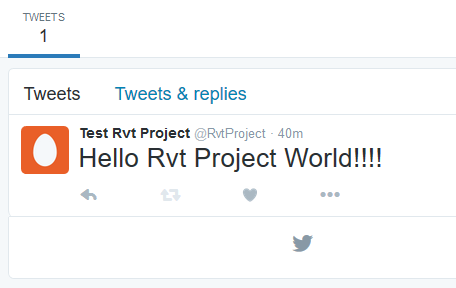
Tweeting from your Project is a breeze with the 'Publish Tweet' node.
Revit Back-up files are useful. However, it can be quite annoying when they fill up a folder and one accidentally starts working off of a back up rather than the latest file.
As a quick fix, I cobbled together a vbs script (learning a bit of vbs in the process) that would delete .rvt and .rfa back files (anything with the pattern <filename>.<####>.rvt or rfa.